Inspiration / Text to GIF
Create a Midnight Ramen Scene
Make a warm restaurant GIF from text: a chef serving a steaming bowl at a late-night ramen counter, with the full scene prompt.
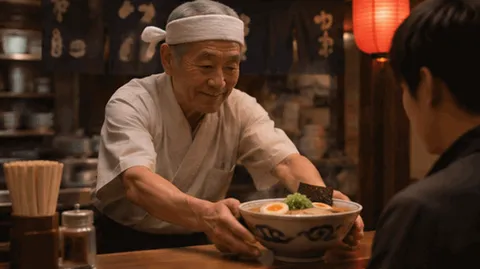
A small restaurant can make an inviting animation without a complicated sequence of events. Warm light, a wooden counter and a bowl of steaming ramen give the scene a clear focus. Start with one action: the chef serving the customer.
About the example
The GIF below was made for GifMyPhoto with GPT Image 2.6 from the scene prompt further down. It shows one moment at the counter: the chef sets the bowl down while steam rises.
No source image was used; this is Text to GIF. Its thumbnail is a frame of the result, not a before image.
Try the template
- Choose Try this prompt to open Text to GIF with the scene prompt filled in.
- Choose the atmosphere first: a quiet late-night shop, warm lighting and a steady camera.
- Keep the action focused on setting the bowl down. Adding eating, dialogue and camera cuts creates a different and more demanding sequence.
- Review the serving hands, bowl shape and counter before judging the lighting or steam.
Scene prompt
A quiet late-night ramen shop with warm tungsten lighting. An elderly chef sets a steaming bowl on the wooden counter for a lone customer. Use a steady medium shot, natural hand movement and soft drifting steam.Local template:
warm-bowl-at-the-midnight-ramen-shop · Suggested recipe, not a verified generation record.Try this prompt What to look for
Watch whether the bowl stays solid and the chef's fingers maintain a consistent grip. Steam should rise from the food without changing the customer's face or the background. Stable shapes and clear contact with the counter matter more than dramatic camera movement.
A short excerpt can restart visibly. If you need a seamless loop, plan the beginning and ending poses together rather than assuming any short video will loop naturally.
For more ways to focus a motion request, read How to Write Better Motion Prompts.
Reference study